Payment reminders for home service pros
Still unpaid? Remind in one tap.
Jobs that still owe money show in red. Tap Remind and a text with the balance and the invoice link is ready to send.
Available on the App Store and Google Play.
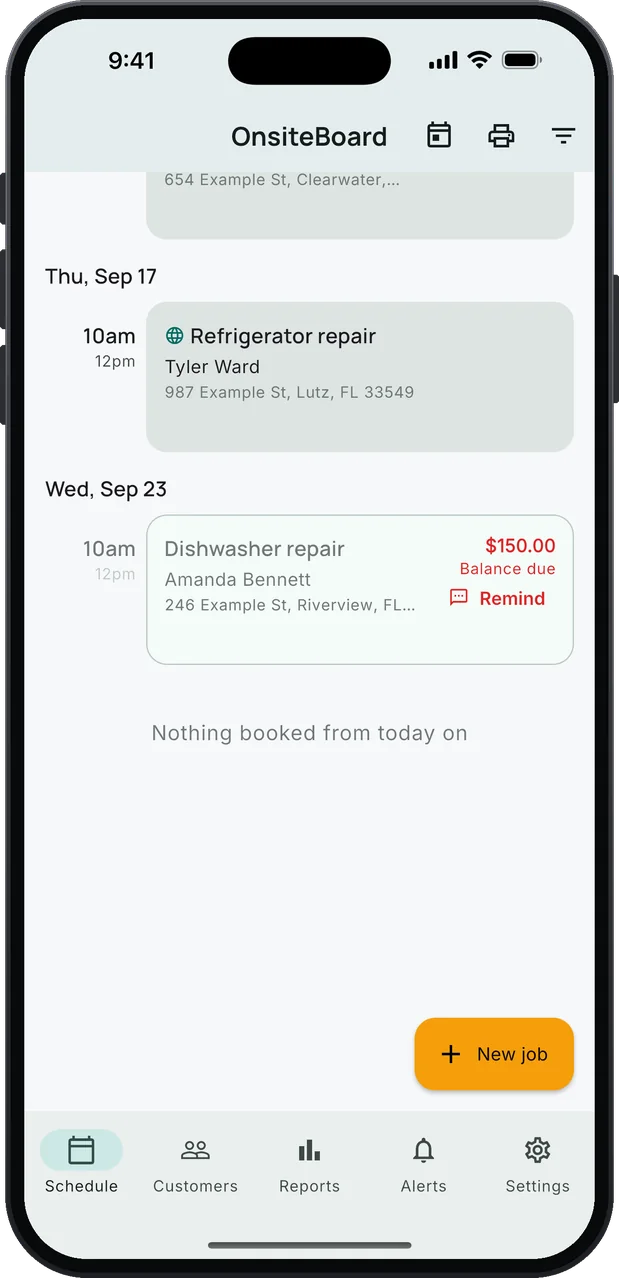
- Balance due in red on the schedule
- Your words, the amount filled in
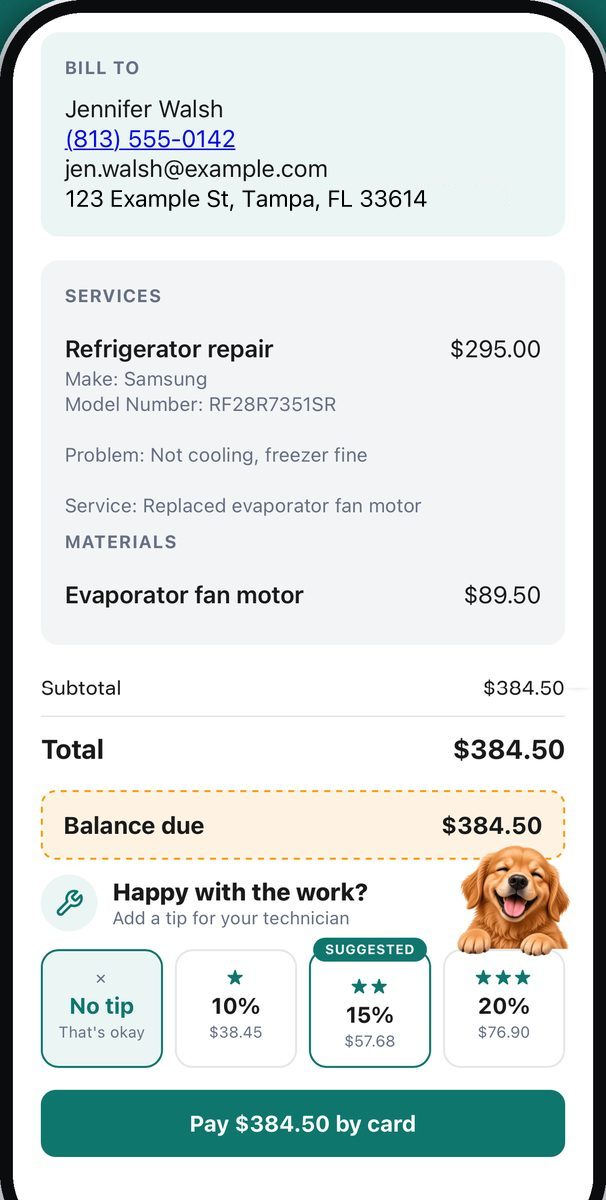
- A link to pay by card, tip optional
From a red balance to paid.
Most unpaid invoices are forgotten, not disputed. A friendly text with a link to pay is often all it takes.
- 1
It shows in red.
When a finished job's invoice still has money owing, its card on your schedule shows the balance due in red, with a Remind button. Deposits and part payments are already taken off; tips don't count. A job that's still an estimate owes nothing and stays quiet.
- 2
Tap Remind.
Messages opens to the customer with the text already written: your reminder, their first name, the amount left to pay, and the invoice link on a line of its own, so it turns into a tap.
- 3
You press send.
It goes from your own phone number, and you read it first. The customer taps the link, sees what the balance is for, and can pay it by card, with a tip if they like.
Hi Amanda, just a friendly reminder that $150.00 is still open on your recent service. Thank you!
Invoice: https://onsiteboard.com/invoice/…
The reminder as it comes, filled in. Change the wording in Settings → Payment reminder text; {total} is what's left to pay, and the invoice link is added below it.
Know who owes you.
The red balance is the reminder. You decide who gets a nudge, and when.
- Nothing sends on its own. OnsiteBoard never texts a customer behind your back. Every reminder is one you read and send yourself.
- Paid clears it. When the customer pays from the link, the payment is recorded, the red balance goes away and you get an alert. Cash or check? Record it on the job.
- Reports show what's owed. The outstanding balance sits next to revenue collected, jobs completed and average ticket, by week, month or year.
- At the desk. On the browser dashboard, Needs attention lists unpaid invoices by age, next to jobs waiting on a part.
Everything else in the box
One app for the whole job, from the booking to the payment. Every feature is in every plan.
Label reading
Photograph an appliance nameplate, a water heater label or an HVAC data plate; brand, model and serial go onto the service line, for you to check.
Paid by card, tips included
Text the invoice; the customer signs, tips and pays by card on their own phone.
Online booking
Customers request a window you're really free on your booking link, and you confirm it. No double-booking from your booking page.
Import your customers
Bring customers and job history over from a spreadsheet or CSV. Repeats matched.
Your day, in time windows
Jobs sit in the arrival windows you set, with a reminder before each one.
Know who's calling
On iPhone, a customer's name shows on the incoming call, even if they're not in your contacts.
Draft from your notes
Tap Draft and the service lines are proposed from the job's notes, priced from your templates.
Browser dashboard
The week, the route, the quotes and who owes you, on a bigger screen. Same account.
One plan. Every feature.
Try all of it free for 14 days. No card needed to start.
or $479.00 a year (about $39.92/mo). Save about $120 a year with the yearly plan, compared with paying monthly.
- Online booking, signatures and payment reminders are in the one plan. No add-ons, no higher tier.
- 14 days free, no card to start
- iPhone, Android and the browser dashboard, one account
- Cancel anytime in your App Store or Google Play settings
Billed through the App Store or Google Play; renews until you cancel. You can start in a browser. The plan itself is bought in the iPhone or Android app. After the trial, without a plan, your jobs, customers and invoices stay viewable and exportable. Creating new work and sending documents by email from OnsiteBoard need a plan. Stripe's card processing fees are separate.
Questions techs ask
Does it send reminders automatically?
Can I change what the reminder says?
Which jobs get a Remind button?
Does the text come from my number?
Can the customer pay from the reminder?
Get paid for the work you already did.
Download OnsiteBoard, close out your jobs, and let the schedule show you who still owes. 14 days free, every feature, no card to start.
Available on the App Store and Google Play.