For solo and small house cleaning businesses Book the job. Do it. Get paid.
A 3 bed 2 bath deep clean, two dogs, the oven and the fridge. Schedule it, price it from your own list by bedrooms and bathrooms, and get it signed and paid by card, on your phone before you leave the driveway. Card payments run through Stripe; its standard fees apply.
Available on the App Store and Google Play.
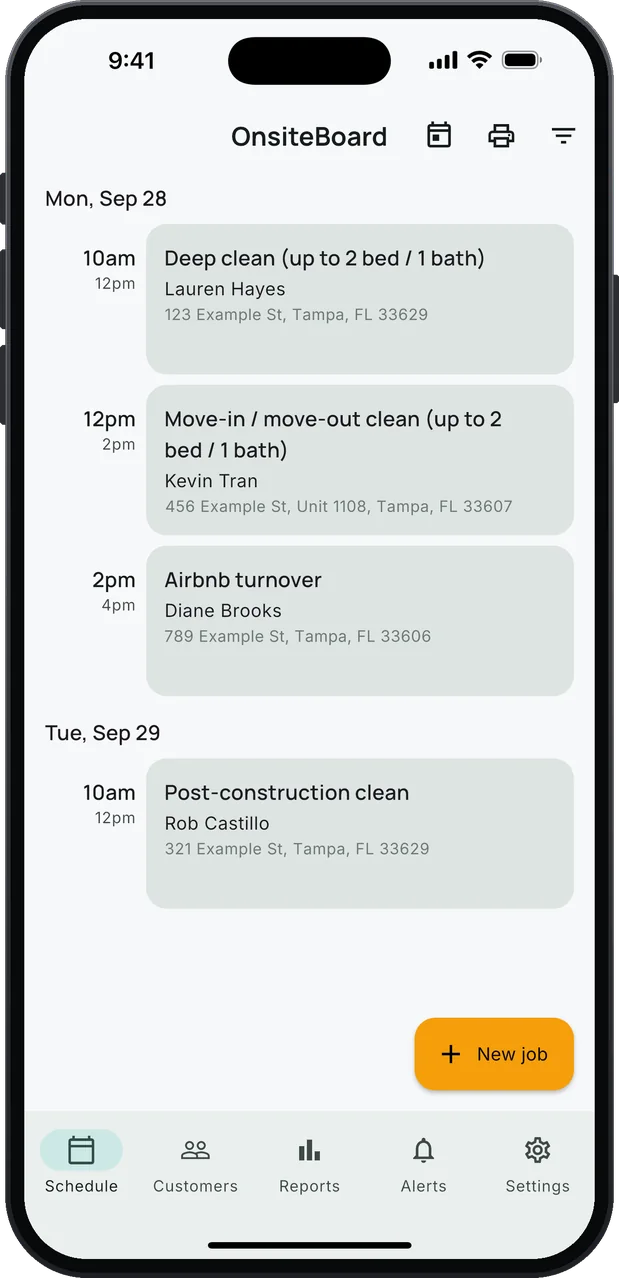
- Schedule in time windows
- 16 house cleaning services, your prices
- Priced by bedrooms and bathrooms
- Add-ons from oven to pet hair
- Invoices signed and paid by card
- Reports and what's owed
See it on your phone
Swipe through the screens from the App Store.
One day with OnsiteBoard
Five things you already do. Less typing in each of them.
-
Book.
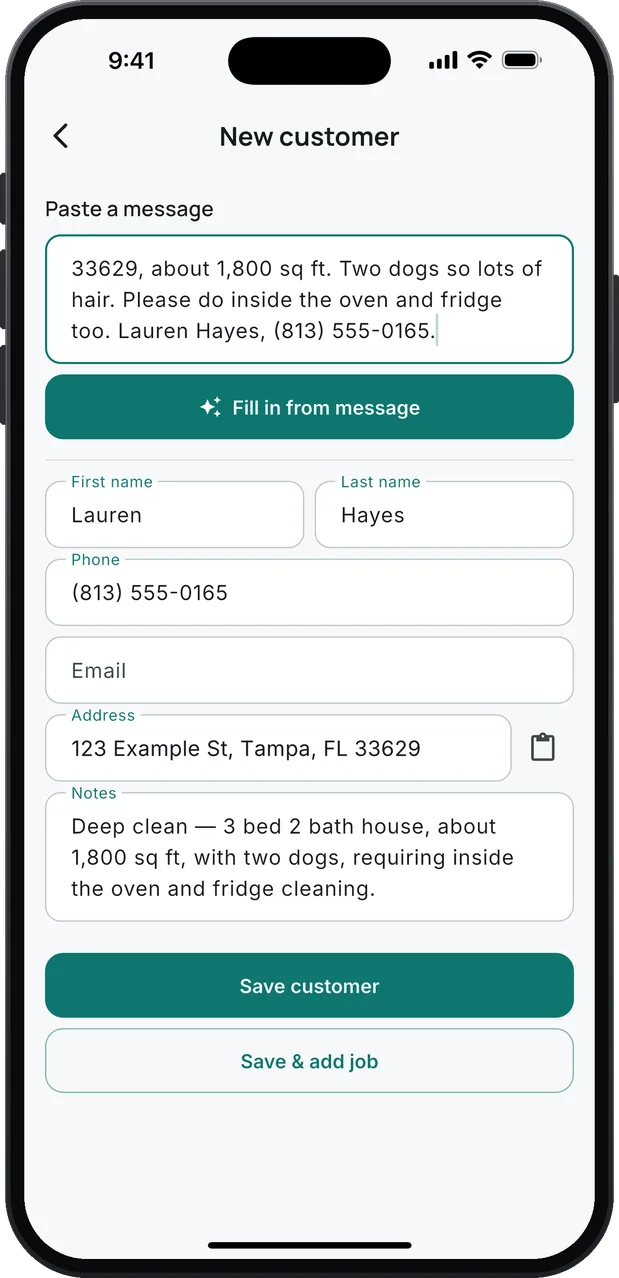
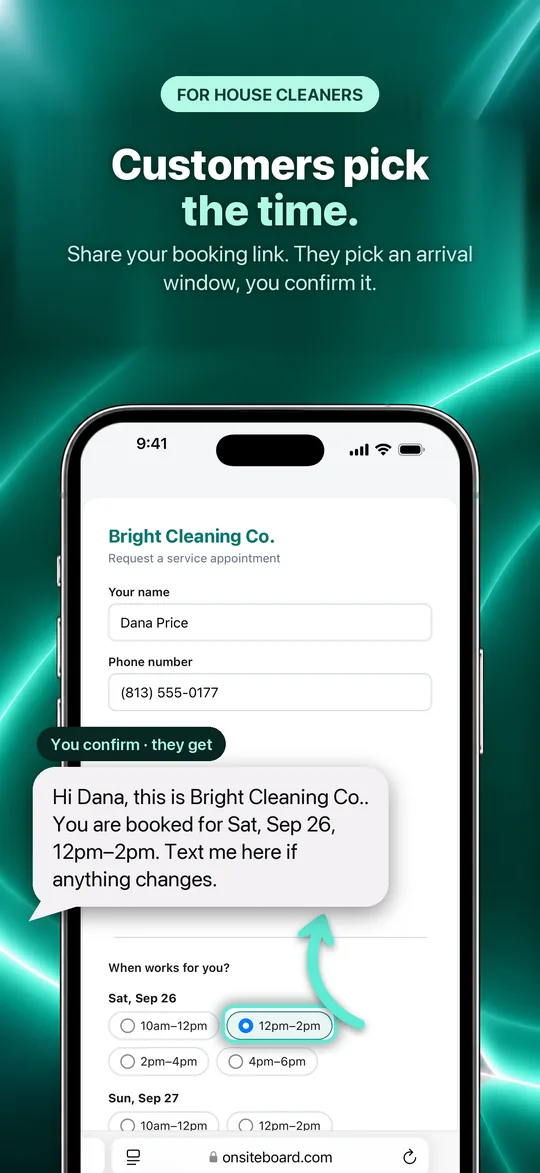
Customers pick a day and a window on your booking link. Or paste their text, "Deep clean, 3 bed 2 bath, two dogs…": name, phone, address and the job fill in. Either way it lands in the app, and you confirm the booking.
-
Drive.
Tap On my way. The status changes, a text to the customer opens with your message already written, and navigation opens to the address.
-
Do the work.
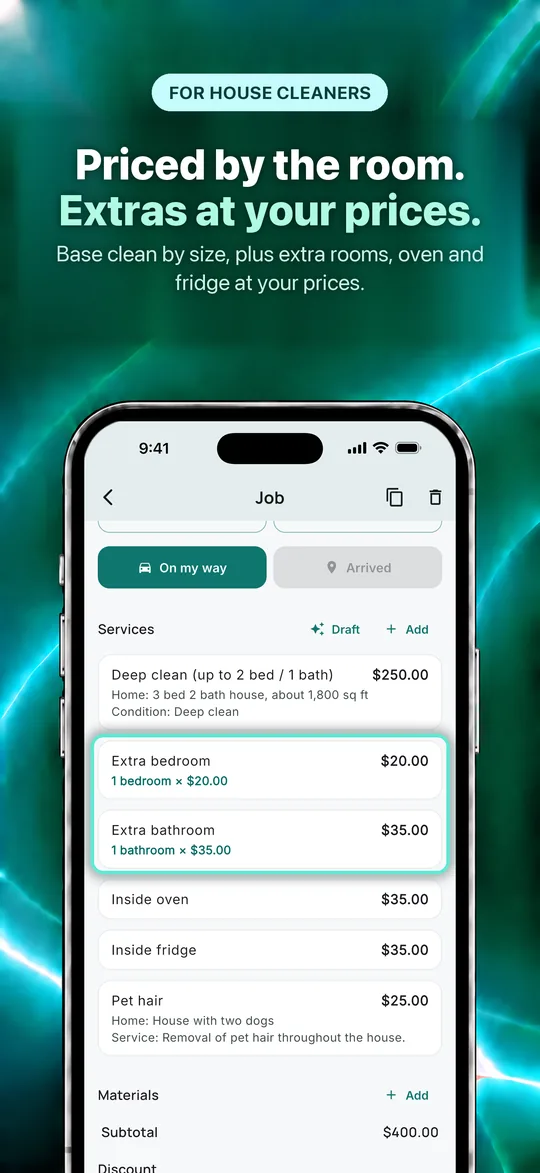
Tap Draft: service lines are proposed from your notes, priced from your list: a 3 bed 2 bath deep clean comes in as the base clean, 1 extra bedroom and 1 extra bathroom.
-
Sign.
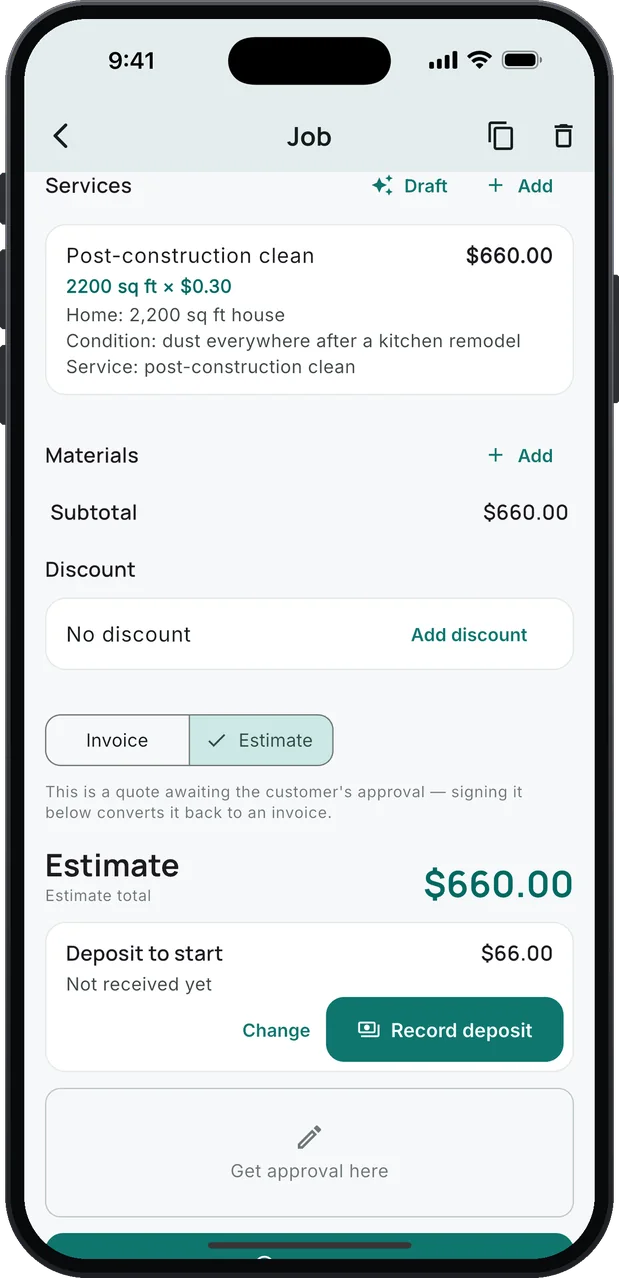
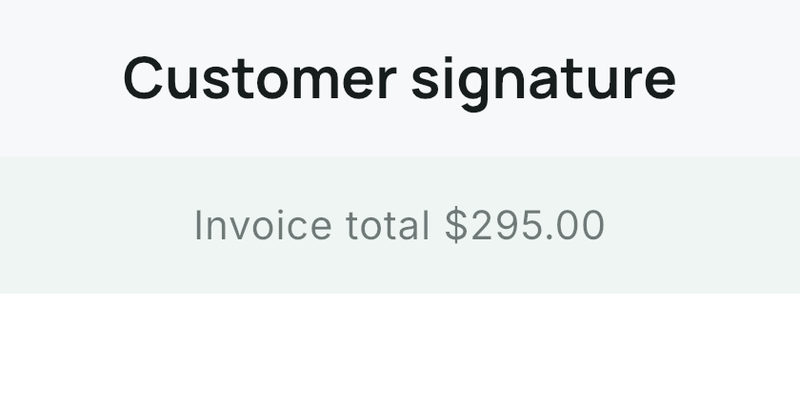
Hand over the phone. The total sits above the pad, so the customer signs for a number they've seen. Or text the estimate with a deposit to start, and they approve it from the couch.
-
Get paid.
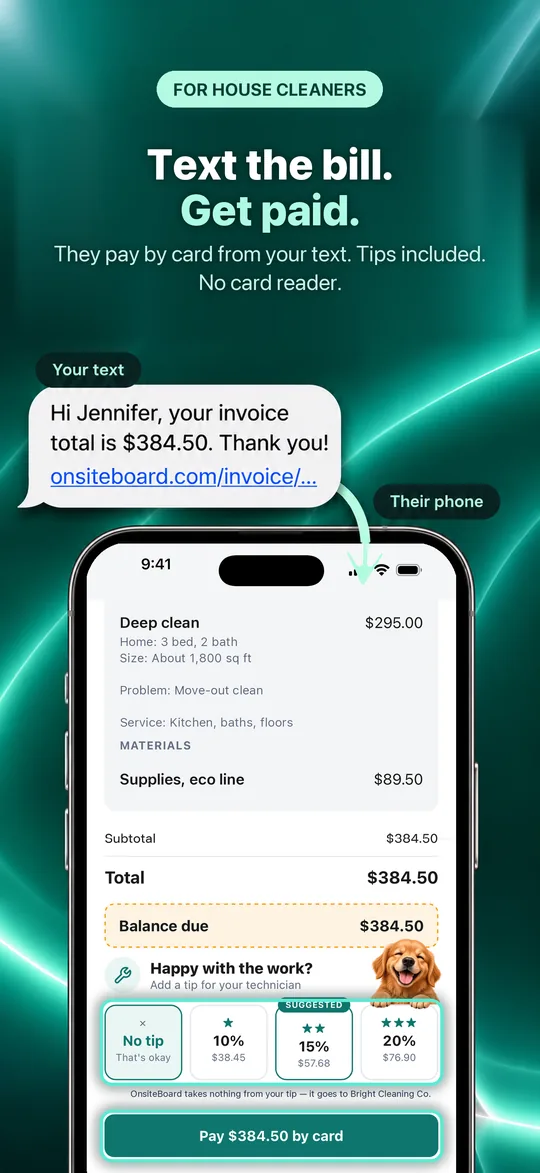
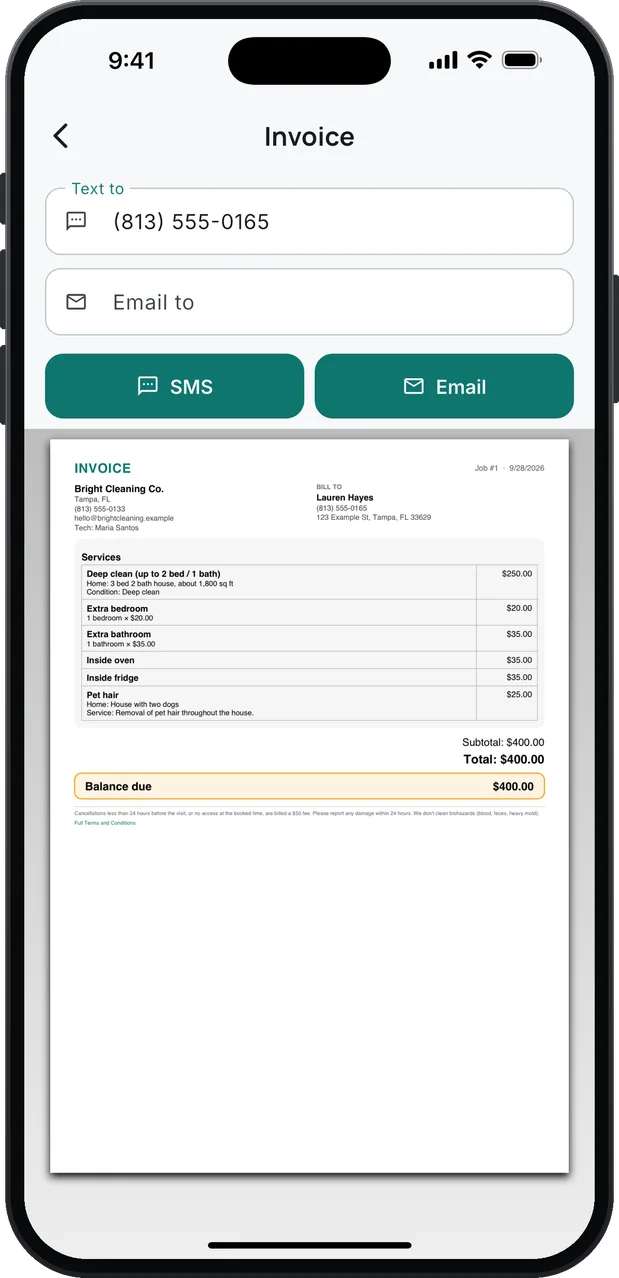
Send the invoice by text or email, with your terms at the bottom. The customer pays by card from the link, tip included, and Stripe sends it to your bank. Cash or check? Record it on the job. Card payments run through Stripe; its standard fees apply.
What's in the box
Everything you need. Nothing you don't.
Your day, in time windows
Jobs sit in the arrival windows you set, 8–10, 10–12, and so on, with a reminder before each one.
Jobs that come in on their own
Customers pick a day and a window on your booking link. Or paste their text, and the name, phone, address and job fill in.
House cleaning services, ready to go
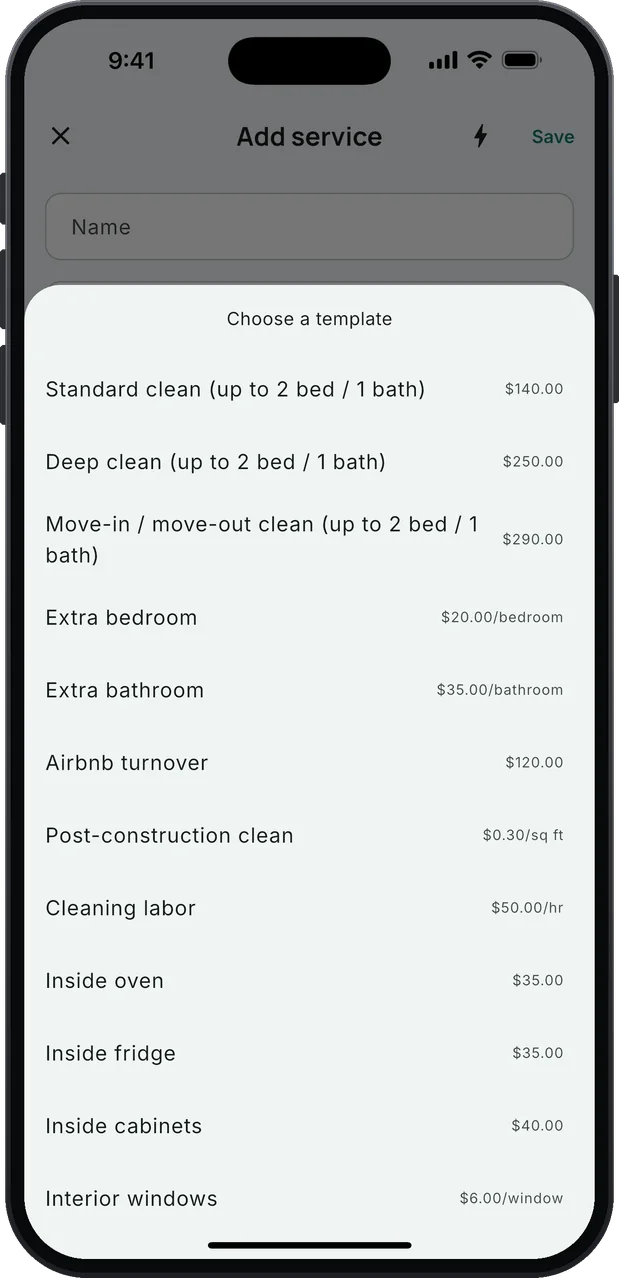
Sixteen common jobs to start from, a $140 standard clean to a $290 move-out, short-term rental turnovers and post-construction, each with a starting price you change in Settings.
Beds and baths, counted
The base clean covers 2 bed / 1 bath. Each room above that is its own line: 1 bedroom × $20.00, 1 bathroom × $35.00.
The home and its condition on every line
Every service line starts with Home, Condition and Service blanks, so the customer can check the invoice against what they booked.
Your terms on every invoice
Write your cancellation and lockout fee, damage reporting and what you don't clean once in Settings; they print at the bottom of every estimate and invoice.
Draft from your notes
Tap Draft and the service lines are proposed from the job's notes: one base clean sized by bedrooms and bathrooms, plus the add-ons asked for. Door and lockbox codes are never copied onto an invoice. Prices come from your list only; you edit and save.
Deposits on estimates
Ask for a deposit up front, as a percentage or any amount, within your state's limits. Record it, or the customer pays it by card. The invoice counts it as paid. Card payments run through Stripe; its standard fees apply.
Signed on your phone or online
The customer signs on your screen, with the total right above the pad, or approves the estimate from a link.
Know who's calling
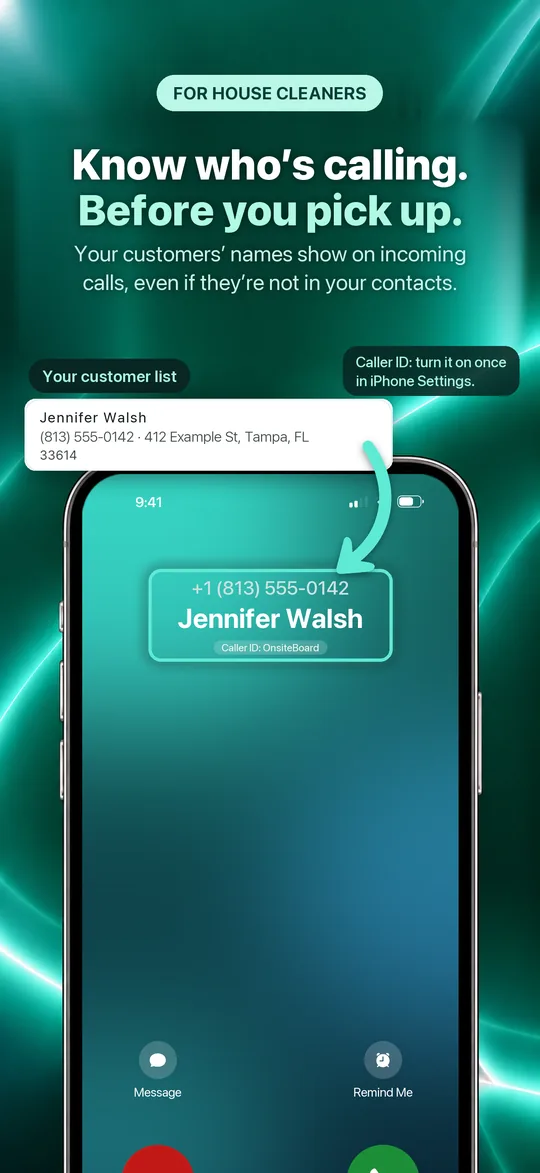
On iPhone, a customer's name shows on the incoming call, even if they're not in your phone's contacts.
Remind in one tap
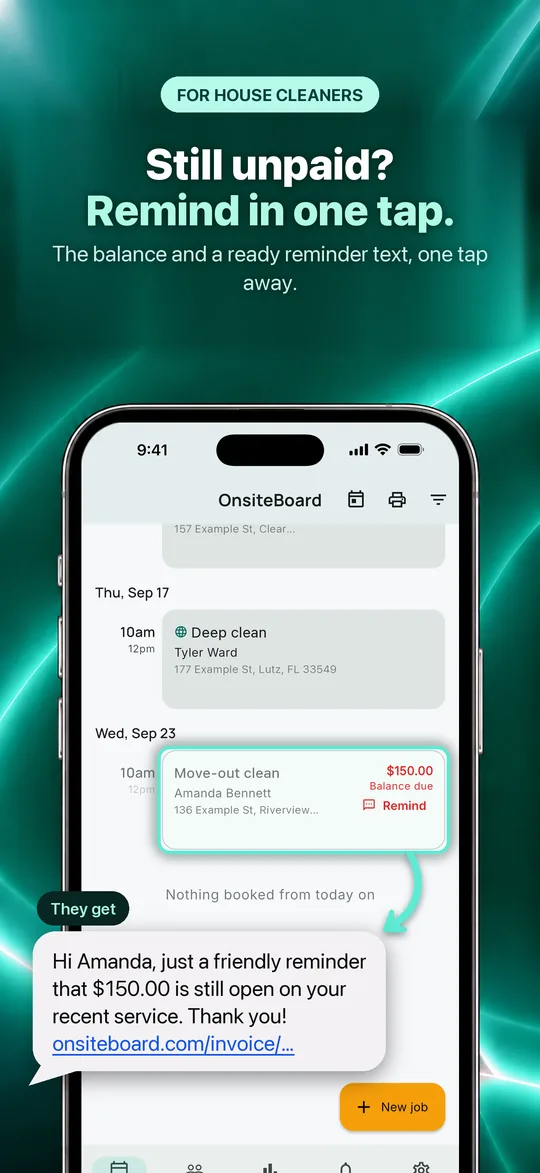
Finished jobs that still owe money show the balance in red on your schedule, with a Remind button that writes the text for you.
Paid by card, no reader
Customers pay the invoice from a link and can add a tip; Stripe sends the money to your bank.
Customers and their jobs
Search by name, street or phone, see every past job, import from a spreadsheet or CSV, export any time.
Reports that answer the question
Revenue collected, tips included, jobs completed, average ticket and what's still owed, by week, month or year.
Jobs save without signal
In the phone app, open your jobs and add new ones in a basement with no signal; they sync when you're back in range.
Also in there: hourly labor at your rate, on any service line · one-tap On my way, with a ready-made text and navigation · alerts when a customer books, signs or pays · message templates · a PDF of every estimate and invoice · your trade in Settings, so the service list and the assistant fit house cleaning.
Priced by bedrooms and bathrooms.
A clean is quoted by the size of the home, so the base clean covers 2 bed / 1 bath and every room past that is counted. The extras go on top, and new builds go by the square foot.
- 1
Pick the clean.
Standard $140, deep $250 or move-in / move-out $290, each up to 2 bed / 1 bath. A short-term rental turnover is $120.
- 2
Count the extra rooms.
Extra bedroom $20, extra bathroom $35, a half bath counts as one: a 3 bed 2 bath deep clean is $250 + $20 + $35 = $305.
- 3
Add what they asked for.
Inside oven $35, inside fridge $35, inside cabinets $40, pet hair $25, interior windows $6 a window, blinds $8 a blind, laundry $20 a load, carpet $55 a room.
- 4
New builds by the square foot.
A post-construction clean is $0.30 a square foot: 2200 sq ft × $0.30 = $660.00. When a job doesn't fit, cleaning labor is $50 an hour.
The bedrooms and bathrooms are what you or the customer give it; OnsiteBoard doesn't measure the home. Jobs are one visit at a time: repeat weekly or biweekly visits aren't scheduled automatically yet.
Start free trial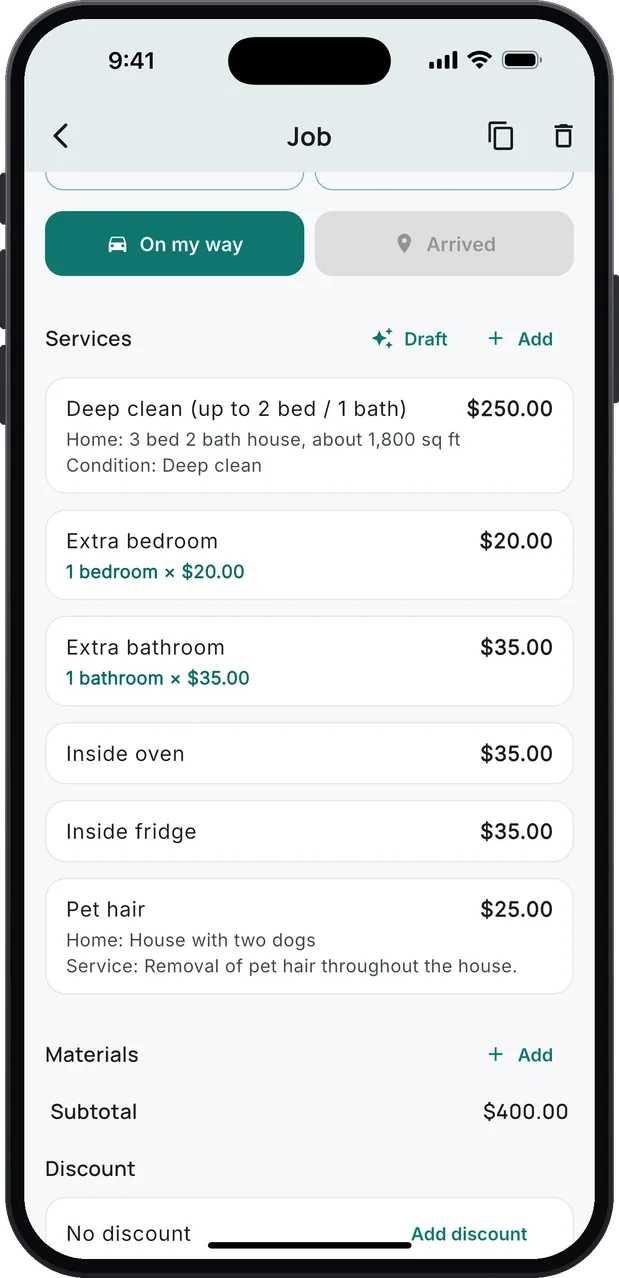
A Book Online button for your website.
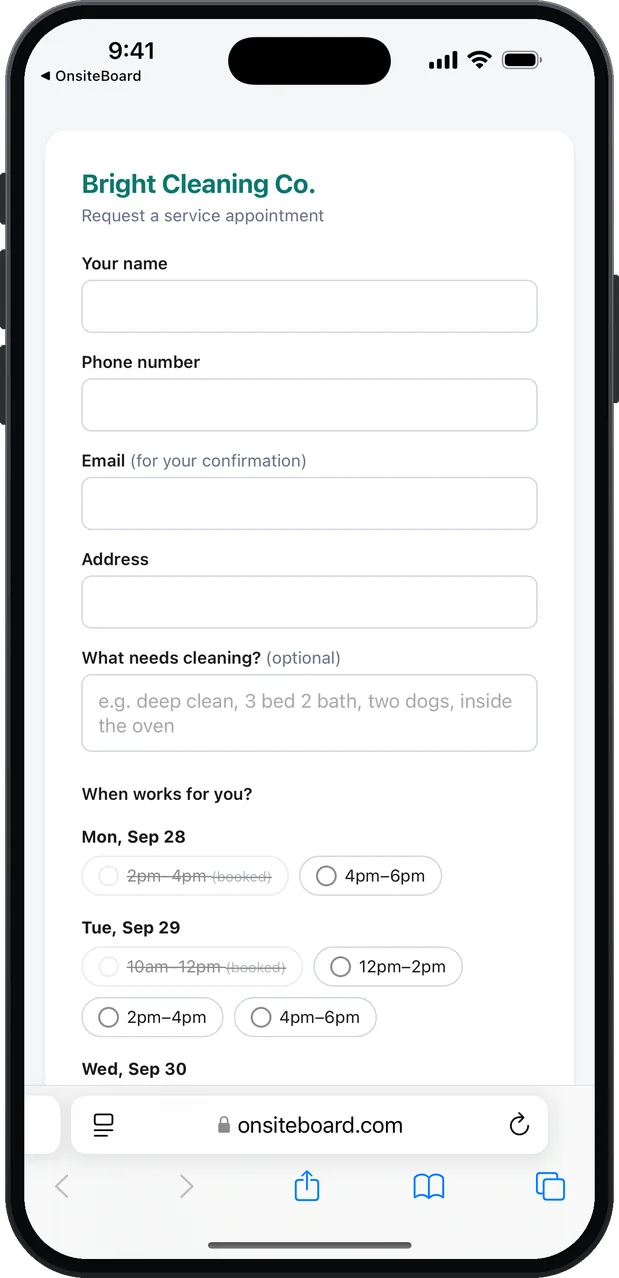
Every account comes with its own booking page. Put the link behind a button on your website, your Google Business Profile, Facebook, Nextdoor or Yelp, and customers send a booking request for a window you're free; you confirm it with one tap.
- Your windows. The page offers the arrival windows you set in Settings, and nothing else.
- Only times you're really free. The page reads your schedule, including jobs you put in by hand, so a customer can't book on top of work you already have.
- Notice you control. Set the earliest day in Settings: one day means a full 24 hours from the moment they book.
- It lands in the app for you to confirm. Name, phone, address and what they need done, in the arrival window they picked, with an alert on your phone. Tap Confirm booking and the customer gets their confirmation email.
- Written for your trade. The "What needs cleaning?" box and its example follow the trade you picked: "deep clean, 3 bed 2 bath, two dogs, inside the oven".
- One window, one request. Two people on the page at once can't both take the same window.
<a href="https://onsiteboard.com/book/your-link">Book online</a>
Copy your own link from Settings → Your online booking link.
Two small things you'll use every day.
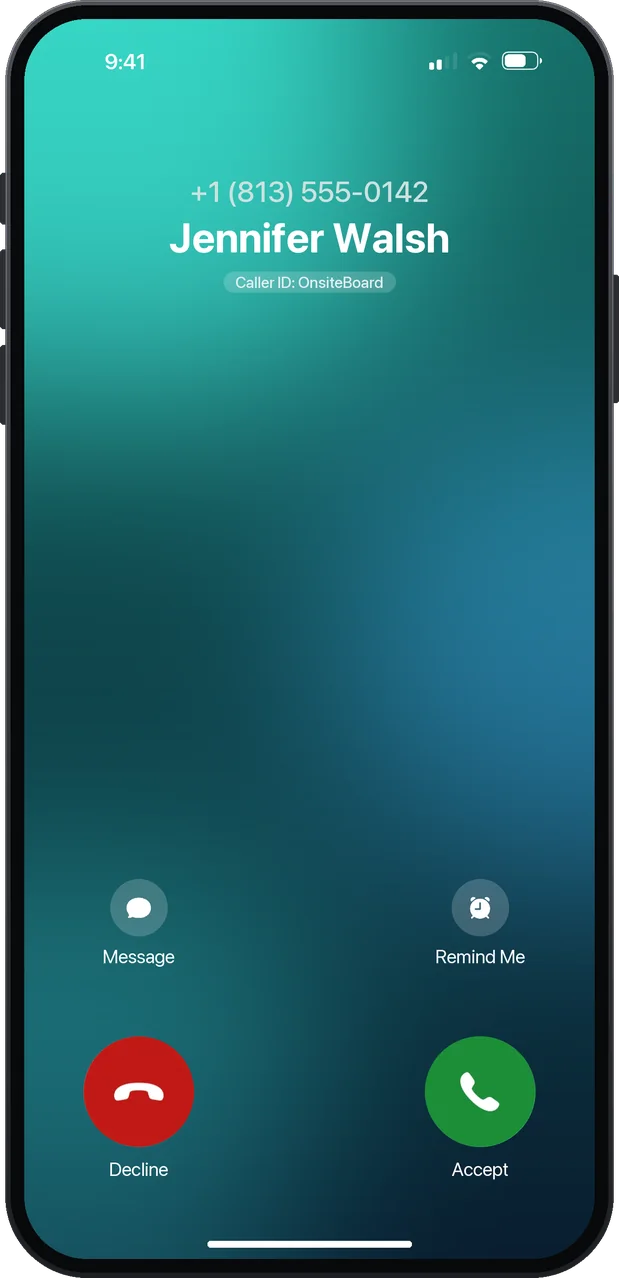
Know who's calling.
Your customers' names show on incoming calls, even when they're not in your contacts. Pick up knowing it's a customer, not a spam call. iPhone only.
A text becomes the customer.
Paste the message and tap Fill in from message. "Deep clean, 3 bed 2 bath, two dogs, inside the oven and fridge…" becomes the customer's name, phone and address, with the job in the notes, written up the way a house cleaner would. Check it, save, add the job.
Get paid before you leave the driveway.
Text the invoice. The customer opens it, signs it, tips, and pays by card. No app on their side. No card reader on yours. Card payments run through Stripe; its standard fees apply.
- A hosted invoice page. Every estimate and invoice is a link you send by text or email. The customer sees the line items, the extra rooms counted, the totals and the balance due — no account, no download.
- Sign online. The customer signs to approve, right on the page. An estimate can be declined, too, and you're told either way.
- Pay by card. One button takes the balance through Stripe. The customer's card number never touches OnsiteBoard.
- Tips, built in. The invoice page offers no tip, 10%, 15% or 20%. Each tip is its own line in the job's payment history.
- The deposit counts. Money taken on the estimate shows as Paid so far, so the customer only pays the balance.
- Your bank, your money. Payouts go to the Stripe account you connect from Settings, inside the app. Stripe may ask to verify your identity. Stripe's card processing fee applies; OnsiteBoard adds no fee of its own.
- Cash and check, too. Record any payment on the job. Reports show what's been paid and what's still owed; the job's payment history shows each payment and each tip.
- Still unpaid? Remind in one tap. A finished job that still owes money shows the balance in red on your schedule. Tap Remind and a text with the amount and the invoice link is ready to send.
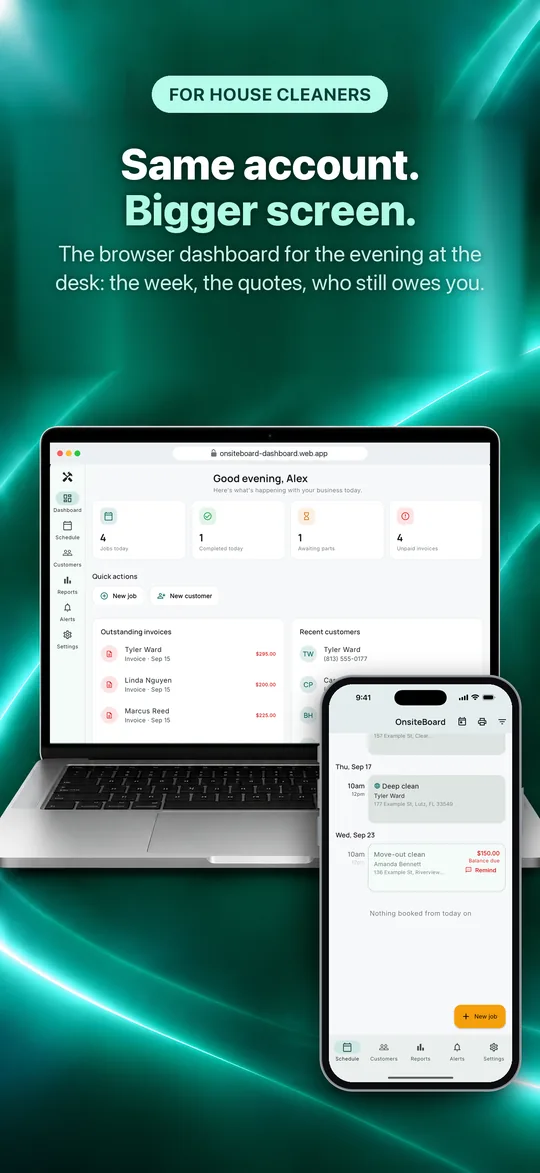
Same account. Bigger screen.
The browser dashboard is for the evening at the desk: the week, the quotes, and who still owes you.
- Today at a glance. What's on today, what came in this week, what's outstanding.
- The week as a grid. Your time windows down the side, days across. An empty cell is a free window.
- Today's stops, in order. The drive between each pair in miles and minutes, and a map, all estimated from the addresses on the jobs. Hand the whole day to Google Maps in one click.
- Needs attention. Unpaid invoices by age, jobs waiting on a part, and payments and bookings as they come in.
Nothing to install. Same sign-in as the phone. Book jobs, edit customers, send invoices, run reports and export CSV, with a keyboard.
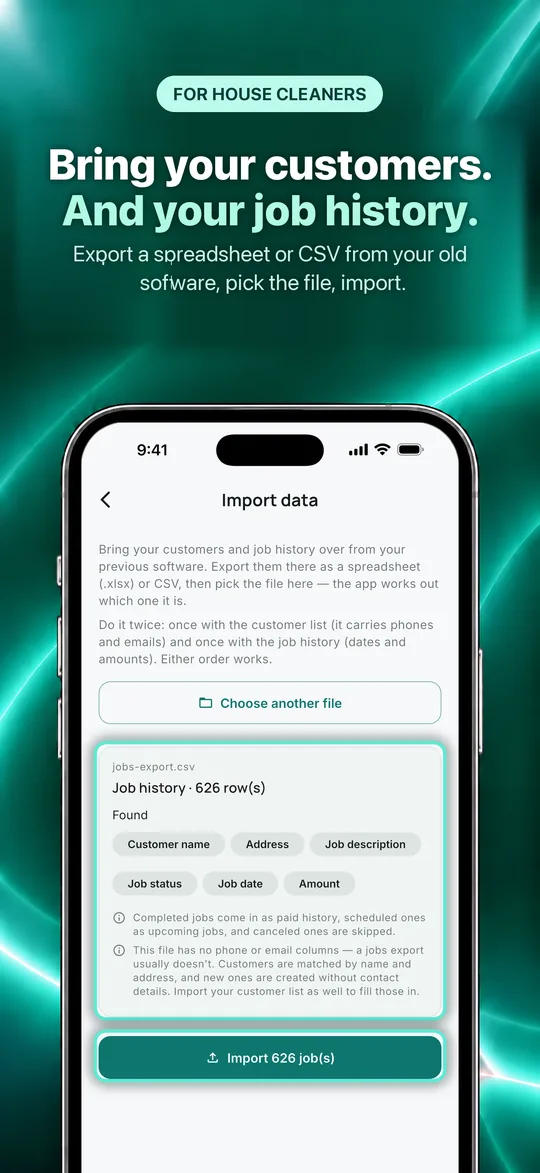
Bring your customers and jobs with you.
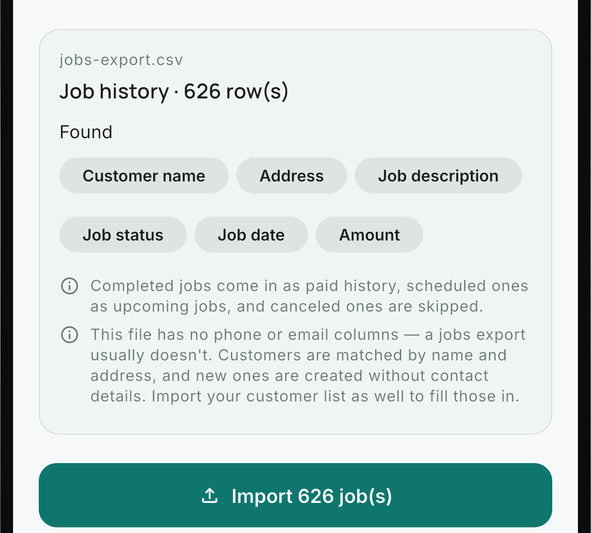
Export a customer list or a job history from your old app or spreadsheet, as .xlsx or CSV, and pick it in Customers. A job history comes in too: each past job with its total and payment, so your work history and revenue reports are there from day one. OnsiteBoard works out which kind of file it is and shows you what it found before anything is imported.
It's built not to double anyone up. Every row is matched against the customers you already have — by phone number first, then by name and address. A match only gets its blank details filled in, nothing you typed is overwritten, and a repeat is skipped. Run the same file twice and you get the same customers, not two of each. Everything exports back out any time.
One plan. Every feature.
Try all of it free for 14 days. No card needed to start.
or $479.00 a year (about $39.92/mo). Save about $120 a year with the yearly plan, compared with paying monthly.
- Online booking, signatures and payment reminders are in the one plan. No add-ons, no higher tier.
- 14 days free, no card to start
- iPhone, Android and the browser dashboard, one account
- Cancel anytime in your App Store or Google Play settings
Billed through the App Store or Google Play; renews until you cancel. You can start in a browser. The plan itself is bought in the iPhone or Android app. After the trial, without a plan, your jobs, customers and invoices stay viewable and exportable. Creating new work and sending documents by email from OnsiteBoard need a plan. Stripe's card processing fees are separate.
Working out your prices? Use the house cleaning price calculator.
Starting out? How to start a house cleaning business
More on this: Card payments · Online booking · Payment reminders · Import customers · Move your data from another app · Job estimate template
Questions house cleaners ask
Can I price by bedrooms and bathrooms?
What about short-term rental turnovers and new builds?
Where do I note the home and its condition?
Are the service prices set for me?
Does my customer's door code end up on the invoice?
Where does my license number go?
Can I charge by the hour?
Can I take a deposit before I start?
Does it work for other trades?
Do I need a card reader?
Does it work offline?
Can I import my customers?
What about Android?
Can my customer pay without an account?
What happens after the trial?
Is my data mine? Can I export it?
Do you track my location?
Can it draft my invoice?
A customer texted me instead of booking. Do I retype it?
Free house cleaning invoice templateFree house cleaning estimate template
Start with tomorrow's jobs.
Download OnsiteBoard, pick House cleaning when you sign up, add tomorrow's jobs, and send your first invoice from the driveway. 14 days free, every feature, no card to start.
Available on the App Store and Google Play.